Category: Physics

  • Exam questions on waves

    Here are exam questions on waves that are common in national exams.

    1. State two differences between electromagnetic waves and mechanical waves (2 marks)
    2. Figure 3 show straight waves incident on a divergent lens placed in a ripple tank to reduce its depth.
    showing exam question diagram on refraction of waves

    Complete the diagram to show the waves in both the shallow region and beyond the lens (2 marks)

    3. A ship in an ocean sends out an ultra sound whose echo is received after 3 seconds. if the wavelength of the ultra sound in water is 7.5 cm and the frequency of the transmitter is 20 kHz, determine the depth of the ocean. (3 marks)

    4. Explain the fact that radiant heat from the sun penetrates a glass sheet while radian heat from burning wood is cut off by the glass sheet. (2 marks)

    Question 5

    5. (a) figure 5 shows a displacement-time graph for a progressive wave.

    displacement time graph for a wave profile on exam  questions on waves
    figure 5

    (i) State the amplitude of the wave (1 mark)

    (ii)Determine the frequency of the wave (4 marks)

    (iii) Given that the velocity of the wave is 20 ms-1 , determine it’s wavelength. (3 marks)

    (b)Figure 6 shows two identical dippers A and B vibrating in water in phase with each other . The dippers have the same constant frequency and amplitude. The waves produced are observed along the line MN:

    Figure 6

    It is observed that the amplitude are maximum at points Q and S and minimum at points P and R.

    (i) Explain why the amplitude is maximum at Q. (2 marks)

    (ii) state why the amplitude is minimum at R (1 mark)

    (iii) State what would have happen if the two dippers had different frequencies . ( 1 mark)

    6. Figure 7 shows water waves incident on a shallow region of the shape shown with dotted line.

    Figure 7

    On the same diagram, sketch the wave pattern in and beyond the shallow region (1 mark)

    7 . Figure 7 shows standing wave on a string. It is drawn to a scale of 1:5

    Figure 7

    (a) Indicate on the diagram the wavelength of the standing wave (1 mark)

    (b) Determine the wavelength of the wave. (1 mark)

    Related topics

  • GRADE Nine (9) TO SENIOR SCHOOL SELECTION FORM

    GRADE Nine (9) TO SENIOR SCHOOL SELECTION FORM

    The Grade 9 to Senior School selection process in Kenya involves students choosing their preferred pathways. They also choose subject combinations and schools. This is done through an online system managed by the Ministry of Education. 

    This process is part of the transition to Senior School under the Competency-Based Education (CBE) framework. Students will select their pathways and subject combinations and they will also choose up to 12 schools across four clusters. STEM is a mandatory pathway.

    SELECTION OF PATHWAYS AND SENIOR SCHOOLS

    • Determination of pathways per senior school
    • Determination of vacancies for boarding and day schooling in senior schools
    • Selection of pathways, subjects’ combination and schools by grade 9 learners

    Selection based on pathway

    The learner will select 12 schools for their chosen pathway as follows.

    • 4 schools in first choice track and subject combination
    • Four (4) schools in second choice subject combination
    • Four (4) schools in third choice subject combination (Total 12 schools)

    Selection based on accommodation

    Out of the 12 schools selected based on pathway:

    • 9 will be boarding schools; 3 from the learners’ home county, 6 from outside their home
      county/county of residence.
    • Three (3) day schools in their home sub county/sub county of residence. (Total 12 schools)
      Pre selection – A school that does not allow open placement can apply to be pre-select if it meets the criteria defined by the Ministry of Education.

    Accommodation- Based Breakdown

    Top 6 learners per gender in each STEM track per sub-county will be placed for Boarding in
    schools of choice

    • Top 3 learners per gender in each Social Science track per sub-county will be placed for
      Boarding in schools of choice
    • Top 2 learners per gender in each Arts and Sports Science track per sub-county be placed to
      Boarding schools of their choice
    • Placement of Candidates with Achievement Level of averaging 7 and 8 per track to boarding
      schools of their choice

    To get the form, click below:

    GRADE 9 TO SENIOR SCHOOL SELECTION FORM

    LEANER’S FULL NAME__________________________________________________

    ASSESSMENT NUMBER (KPSEA) __________________________________________

    DATE OF BIRTH____________________________GENDER ([] Male [] Female)

    CURRENT School NAME:_________________________________________________

    COUNTY OF Residence: _______________Sub-County of Residence_________________

    Parent/Guardian Name__________________________________________________

    Parent/Guardian Phone Number _____________________ID No___________________

    B. Selected Pathway & Subject Track

    [] STEM (Science, Tech, Eng., Math) __________________________________________

    [] Social Sciences______________________________________________________

    [] Arts & Sports Science__________________________________________________

     C. School Choices – Based on Pathways

        First choice (4 schools):

    1. School Name & County_______________________________________________
    2. School Name & County_______________________________________________
    3. School Name & County _______________________________________________
    4. School Name & County________________________________________________

     Second choice (4 schools):

    1. School Name & County________________________________________________
    2. School Name & County________________________________________________
    3. School Name & County_______________________________________________
    4. School Name & County________________________________________________

         Third choice (4 schools):

    • School Name & County _______________________________________________
    • School Name & County _______________________________________________
    • School Name & County _______________________________________________
    • School Name & County _______________________________________________

       D. Accommodation- Based Breakdown

           [] 3 Boarding Schools within home county

          [] 6 Boarding Schools outside home county

          [] 3 Day schools in home sub-county

    E. Teacher’s recommendation

    ___________________________________________________________________ ____________________________________________________________________________________________________________________________________________________________________________________________________________

     F. Learner’s Signature

                   Signature_________________________Date____________________________

     G. Parent/Guardian Consent

     I confirm that the above choices were made in consultations with the learner and based on MoE  guidance.

       Name_______________________________________________________

        Signature________________________ Date _________________________

    Download Microsoft word format free

    Related topics


  • Fundamental theorem of calculus

    Fundamental theorem of calculus

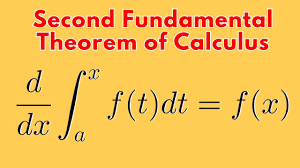
    The Fundamental Theorem of Calculus  establishes a crucial link between differentiation and integration.

     It essentially states that these two operations are inverses of each other, and it provides a way to evaluate definite integrals using anti-derivatives.

    Suppose that f is continuous at a closed interval [a, b] . If the function F is defined on a closed interval [a, b] by:

    $$F(x) = \int_{a}^{x} f(t) dt $$

    where a is a real number, Then F is the anti-derivative of f. in other words, F'(x) = f(x)

    consider the relationships:

    then

    f(x) = x2 and

    Note: We use the dummy variable (t) in the integrand to avoid confusion with the upper limit x.

    Sometimes the fundamental theorem of calculus is interpreted to mean that:

    differentiation and integration are inverse processes to each other.

    It follows that:

    The fundamental theorem of calculus states that:

    if f is continous on an open interval containing a and x and then we first integrate the function f and then differentiate with respect to x, then the result we get is the function f again.

    In other words, the fundamental theorem of calculus argues that differentiation cancels the effect of intergration of continous f(x’).

    in short:

    For example

    Example problem1

    Use the fundamental theorem of calculus to find derivative of the following functions

    (a)

    solution

    NOTE: The best way to benefit from this examples is trying the problem first before looking for answers and attempting again after checking your work against the answer.

    Example problem2

    (b)

    solution to problem 2
    Example problem 3

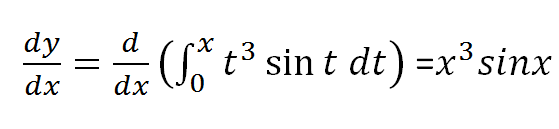
    Find h'(x) given that :

    solution

    let y=h(x) and u=x2 and hence:

    since u=x2;

    and therefore:

    By use of chain rule:

    which implies u3sinu(2x) = (x2)3sin(x2)2x resulting to:

    =2x7sin(x2)

    Example problem 4

    Consider the expression below, we exchange the limits in the intergral and then change the sign from positive to negative before using the fundamental theorem to solve it.

    Example problems on fundamental theorem of calculus

    We exchange limits and so the sign of the integral so that the upper limit is the valuable x.

    Example problem 6

    Use the fundamental theorem of calculus to solve:

    Solution

    splitting the integral about point zero we have:

    and then exchanging limits in the first integral;

    let u=-x; first part of the expression above becomes;

    from laws of differentiation du/dx=-1 and using chain rule;

    and hence

    and finally

    Revision Exercise

    $$1. \ \frac{d^2}{dx^2}(\int_{x^3}{1789} \frac{1}{t}dt)$$ $$2. \ \frac{d}{dx}(\int_{x}^{x^2}e^{-t^2}dt)dt$$ $$3. \ \frac{d}{dx}(\int_{2}^{3x} sint^2)dt$$ $$4. \ \frac{d}{dx}(\int_{1}^{e^x}ln(1+t^2))dt$$ $$5. \ \frac{d}{dx}(\int_{0}^{sinx}(\sqrt{1+t^2})dt)$$

    Answers to revision exercise

    $$(1.) \ \ \frac{3}{x^2} \ \ (2.) \ \ 2xe^{-4x^4} – e^{-x^2} \ \ (3.) \ \ \ 3sin9x^2$$

    Related topics


  • mastering use of fx-82ms calculators

    mastering use of fx-82ms calculators

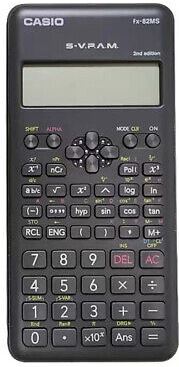
    The most common calculator used by high school learners is ms fx-82 model. Calculator has many scientific functions that can help a student work out many scientific computations. However, ms fx-82 calculator is non-programmable.

    Casio fx-82MS Scientific Calculator

    The Casio fx-82 MS is a widely used scientific calculator. It is especially favored by students and professionals for its reliability. It also complies with exam requirements.

    Key Features of fx-82 calculator:

    • 240 Functions: Includes trigonometric, statistical, fractional, and exponential calculations.
    • Natural Textbook Display: Shows expressions as they appear in textbooks for easy comprehension.
    • Two-Line Display: Simultaneously displays input and output for clarity.
    • Multi-Replay Function: Allows quick recall and editing of previous formulas.
    • STAT-Data Editor: Supports mean, standard deviation, and regression analysis.
    • 9 Variable Memories: Stores and recalls up to 9 data sets for efficiency.
    • Durable Design: Features robust plastic keys and a protective slide-on hard case.
    • Battery Powered: Operates on a single AAA battery.
    • Non-Programmable: Compliant with exam standards for academic use.
    • Portable and Lightweight: Compact design for easy everyday use.

    Handling Precautions

    • Even if the calculator is operating normally, replace the battery at least after every two years. Continued use after the specified number of years can result to abnormal operation.
    • You should replace the battery immediately after display figures become dim.
    • A dead battery can leak, causing damage to and malfunction of the calculator. Never leave a dead battery in the calculator.
    • The battery that comes with the calculator is for factory testing, and it discharges slightly during shipment and storage. Because of these reasons, its battery life can be shorter than normal. For that reason, consider replacing the battery sooner.
    • Avoid use and storage of the calculator in areas subjected to temperature extremes, and large amounts of humidity and dust.
    • Do not subject the calculator to excessive impact, pressure, or bending.
    • Never try to take the calculator apart.
    • Use a soft, dry cloth to clean the exterior of the calculator
    • Do not use a nickel-based primary battery with this product.
    • use of incompatible batteries such as nickel-based primary battery with fx-82ms calculator can result in shorter battery life and product malfunctioning.

    Turning Power On and Off

    • In order turn on the calculator. Press:

    • to turn off the calculator: press (OFF). that is;

    Adjusting Display Contrast

    To show the display setup screen, press:

    A scree appears as shown:

    press 2 and the use > and < to adjust display contrast. when satisfied with the display settings, press AC button

    use of calculator keys

    To use the alternate function of a key, press [SHIFT] key followed by the key. The alternate function is indicated by the text printed above the key. The alternate function is usually marked with a different color from the main key.

    Basic operations in calculator

    • use AC button to clear all values.
    • To clear memory press shift then mode . Three screens will display as follow:
    • to clear memory press:
    • If your calculator has FIX or SCI on the display press mode three times to get the following screens:

    pressing 3 followed by 2 takes you to a normal mode.

    • If your calculator has RAD or GRAD on the display, then press mode two times to get the following on the screen:

    DEG represents Degree mode and you get there by pressing 1.

    • To display a decimal point as a dot or a comma such as 200.678 or 200, 678, you can press mode button 4 times until DISP 1 is displayed.

    press 1 then forward button once.

    press 1 to separate thousands with a comma(,) or press 2 to separate thousands with dot (.)

    • To initialize the calculator and return the calculation mode and setup to their initial default settings. use the following procedure:

    This operation also clears all data currently in calculator memory.

    Related topics